How “AI Shodo” Works
AI Shodo does not use an image-generation AI. It writes calligraphy with a language model.
A typical image-generation AI outputs a finished image directly. Calligraphy, however, is an art that values the process: where the brush is set down, how hard it is pressed, how it is moved and how it is stopped. An image-generation AI has no such process, so it cannot express the essence of calligraphy.
A language model, on the other hand, cannot output images, but it can generate the process of the brushwork as data. By using a language model, we can simulate the very act of “writing calligraphy” and may be able to reach an expression closer to the essence of the art.
Language model × calligraphy engine
The language model is given the following information as input.
- System prompt:
- Specifications of the calligraphy engine: the input data format, the definition of paper and coordinates, how to write a stroke, and how brush and ink work
- Calligraphy know-how: principles of brush movement, examples of techniques such as exposed tip, turning corner, hook and sweep, an example of how to write “永” (the Eight Principles of Yong), and tips and mindset for writing good calligraphy
- Task text: a sentence that tells the model what to write. (Example: “Write 『春風』 in regular script.”)
From these two pieces of information, the language model outputs the actual movement of the brush as data. The program that turns this data into an actual image is the calligraphy engine sho.js. sho.js is an original program that reproduces the characteristics of the calligraphy brush, simulating the physics of brush and paper to complete the work.
- System promptEngine specs and calligraphy know-howTask text(e.g.) Write “春風” in regular script
- Language modelPlans the brushwork
- Brush-movement data
{"p":[[377,327,0.06,null,0.8],[418,352,1],… - Calligraphy enginesho.js
- Work
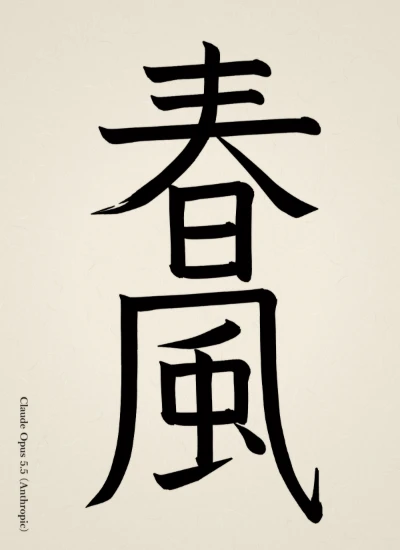
The character of each model
sho.js is responsible only for the physical reproduction of brush and paper. Every expressive decision — how to move the brush, what shape to give each character, how to compose the sheet — is left entirely to the language model. As a result, each model’s characteristics show clearly in its works. Comparing the works, you can observe differences between models in their depth of understanding of calligraphy, the correctness of stroke order, technical skill and the quirks of their letterforms.
sho.js specification
This section explains the shape of the brush-movement data, the meaning of its values and how sho.js turns the data into lines, with working examples. The same content is also included in the system prompt given to the language model. (The full system prompt is here; it is written in Japanese.)
Data format
The data is in JSON Lines format: one JSON object per line. sho.js processes it from top to bottom.
{"t":"brush","size":58}
{"c":"永"}
{"p":[[377,327,0.06,null,0.8],[418,352,1],[434,376,2.0,null,0.3,0.12],[430,372,0.06,null,0.4]]}
{"p":[[311,528,0.1,null,0.5],[317,534,1.1,null,0.4], …]}
…
{"comment":"I extended the foot of the right sweep a little."}| Line | Meaning |
|---|---|
{"t":"brush","size":58} | Declares the brush to use. size is the line width at pressure 1.ink_tone (ink darkness) and ink_load (ink amount) can also be specified. When drawing an emoji, the brush can be switched once. |
{"c":"永"} | Declares the character about to be written. The brush takes up ink at this point (re-inking). To skip it, write {"c":"永","no_dip":true}. |
{"p":[[x,y,…],…]} | The data of one stroke: a list of points that the brush passes through in order. |
{"dip":0.6} | The amount of ink taken up when re-inking. |
{"comment":"…"} | The model’s remarks after finishing the work. |
The paper is a portrait-format hanshi, 1000 wide × 1376 high. The top left is (0, 0) and the bottom right is (1000, 1376).
How a stroke is described
A stroke is a series of points, and each point is written as [x, y, pressure, angle, speed, pause]. Any value can be left out by omitting it or writing null. Adding "k" makes that point a corner.
| Value | Range | Meaning | If omitted |
|---|---|---|---|
| x, y | Paper coordinates | Position of the brush tip | (cannot be omitted) |
| pressure | 0–2 | How deep the brush is pressed into the paper. At 1 the line is as wide as the brush size, at 2 twice as wide. Near 0, only the tip touches and the line is pointed | Interpolated from the neighboring points (1 if all are omitted) |
| angle | Degrees | Direction from the tip toward the belly of the brush | Keeps the previous point’s angle (42 at first) |
| speed | 0.05–6 | How fast the brush moves. 1 is “brush size × 20” per second | Interpolated from the neighboring points (1 if all are omitted) |
| pause | Seconds | How long the brush rests at that point. The longer it rests, the darker the ink and the rounder and fuller the outline | 0 |
| "k" | — | Makes the point a corner instead of connecting smoothly (turning corner) | Smooth |
The calligraphy engine joins the points with a smooth curve (centripetal Catmull-Rom), and pressure, angle and speed are also interpolated between points.
Brush: tip and belly
A brush is a bundle of several hundred hairs (about 300 for a size-60 brush; thicker brushes have more), shaped like a drop: thin at the tip and full at the belly. The position of a point is the tip, and the line spreads from the tip in the direction of the angle, with a width of pressure × brush size. The harder the brush is pressed, the more of the belly lies on the paper and the thicker the line; when it is lifted, the line shrinks back to the tip and becomes thin and pointed.
The angle is the tilt of the brush. At the default of 42, the belly lies to the lower right of the tip (oblique brush), so the thick part lies to the lower right of the point. If the angle is aligned with the direction of travel, the tip runs through the center of the line (centered tip) and the brush moves along its axis, so the line is thin. When the brush moves across its axis, the line is at its thickest.
Ink: darkness and amount
Ink is determined by two values, darkness and amount, both specified in the brush declaration. If omitted, both are 1: a brush well loaded with dark ink. The two are independent and are used in combination.
Ink darkness ink_tone (0–1) sets the shade of the color and how easily it bleeds. 1 is dark black ink, and lowering it gives a lighter gray. Light ink contains a lot of water, bleeds beyond the line, and leaves a slightly darker edge on the outer rim. The bleeding spreads more where the writing is slow and does not appear in dry-brush areas.
Ink amount ink_load (0.2–1.5) is the amount of ink the brush holds. It does not change the color; it only decides how easily the brush goes dry.
Ink: dry brush and pauses
Each hair holds ink and loses it as it travels over the paper. While ink remains, the line stays connected; where it runs out, the line breaks up along the grain of the paper, producing streaky dry brush. The less ink, the faster the movement, and the later the stroke within the same character, the more easily the brush goes dry. Ink is re-loaded for every character (at each {"c":…} line). The ink on the paper has cloud-like unevenness, so dry brush is not uniform but appears in patches.
Where the brush rests (pause), ink pools and darkens, and the outline bleeds roundly. The longer the pause, the larger the bleed. The lighter the ink, the sooner it bleeds.
Corners: turning corner
At a "k" point the curve is not joined smoothly but forms a corner. Where a stroke turns from horizontal to vertical, slow down before the corner, press in and pause at the corner, then ease the pressure a little after changing direction and bring it back; this leaves a “shoulder” at the corner.
Calligraphic techniques
sho.js has no built-in routines for techniques such as hooks and sweeps. As with a human brush, exposed tip, hidden tip, stop, hook, sweep, hanging dew and hanging needle are all expressed only through the combination of each point’s position, pressure, angle, speed and pause. For example, a left sweep goes down while the brush angle turns clockwise, sinks once at the lower left, then raises speed and releases pressure as it flows out to the left. Below is the example of “永” (the Eight Principles of Yong) given in the system prompt.
What the language model has to do
Simply lining up coordinates to trace the shape of a character does not make good calligraphy. For every stroke, the language model has to keep the following in mind and design the work as a whole.
- Brush size: choose one suitable brush for the whole work. Too thick and the white space fills up; too thin and the writing looks lean.
- Pressure: vary it between the start, the middle and the end of a stroke. Lines of constant pressure look flat.
- Angle: oblique brush or centered tip? At the end of sweeps and vertical strokes the brush is turned. Turning changes the line width, so compensate with pressure.
- Speed and pause: slow and resting at stops, fast at the tips of hooks and sweeps. Speed also changes how the brush goes dry.
- Ink darkness and amount: dark ink is the basis of regular script. Light ink adds softness and lingering resonance, and a restrained ink amount gives energetic writing that makes use of dry brush.
- Position of the tip: a point is the tip, not the center of the line. With an oblique brush the thick part of the line lies to the lower right of the point, so place points thinking of how the line will look.
- Stroke order and composition: write in the correct stroke order, and decide the position, size and white space of the characters within the whole sheet.
Random numbers are determined by the brush position, so the same data always produces the same calligraphy. All differences between works come from differences in the numbers the language models wrote.
GitHub
Coming soon
References
- 新装版 書の技法用語100ハンドブック (ed. Kaseiya Shodo Editorial Dept.)
- 脳トレ書道トレーニングブック 書道で長生き! (Hiroyuki Aoyama)
- 現代書道全集〈一〉楷書 (Kodansha, 1967)
- 現代書道全集〈二〉行書 (Kodansha, 1967)
- 現代書道全集〈三〉草書 (Kodansha, 1967)
- 現代書道全集〈四〉かな (Kodansha, 1967)